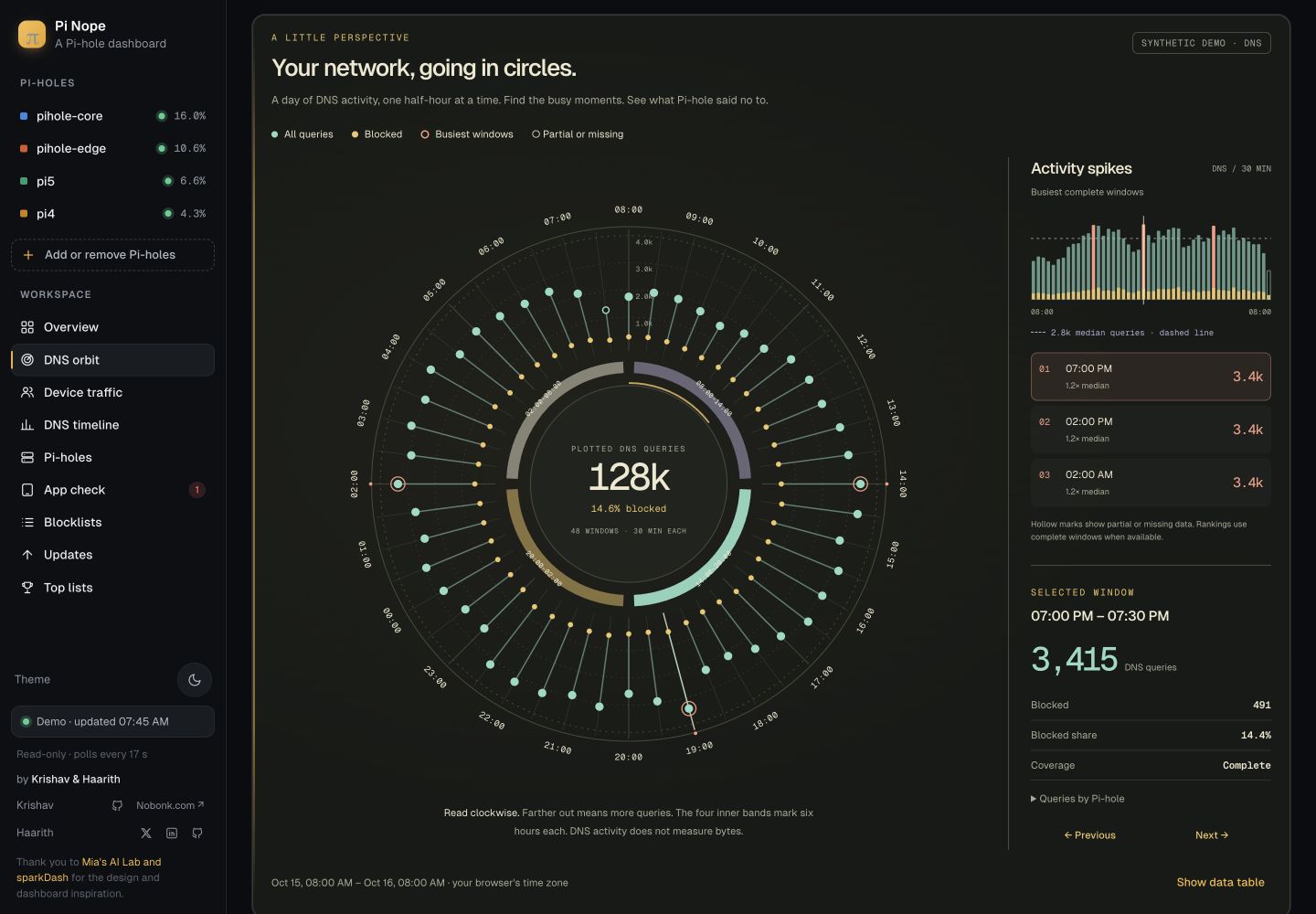
A day, at a glance.
Follow 48 half-hour windows around the dial. Mint shows DNS requests. Gold shows blocked requests. Select a spoke to see the detail.
See all your Pi-hole servers in one place. Check DNS requests, blocked domains, and busy periods. Pi-hole blocks the requests. Pi Nope shows the results.
Mac · Windows · Linux / Free, open source
DNS turns a domain name into an address. Pi-hole blocks requests for domains on its blocklists.
Follow 48 half-hour windows around the dial. Mint shows DNS requests. Gold shows blocked requests. Select a spoke to see the detail.
Check query totals, blocked domains and server status together. Gaps stay visible, so an offline server never looks like a quiet one.
Find periods with many DNS requests. Choose a dark or light view. Use your keyboard or a phone.
Pi-hole blocks unwanted DNS requests. Pi Nope reads data from Pi-hole. You can try the public demo without installing either app.
Use a supported Linux computer, such as a Raspberry Pi. It can be a different computer from Pi Nope. Give it a fixed local address. Read the requirements and follow the official Pi-hole install guide.
Open its admin page. Follow the Pi-hole network setup guide to make a device use Pi-hole for DNS. Confirm that requests appear. Keep the Pi-hole computer on.
Download the app for your computer. Extract the archive and open the app. On Mac or Linux, you can also use the Bash installer below.
In Pi Nope, select Add or remove Pi-holes. Enter your Pi-hole v6 address and app password. Create the app password in the Pi-hole web interface settings. Keep this password on your own computer.
Download the script. Read it. Then run it. The script checks your system and the package checksum. It installs Pi Nope for your user account. It does not start the app or change DNS.
Do not use sudo. Windows users: use the ZIP download below.
curl -fL --proto '=https' --proto-redir '=https' --tlsv1.2 \
  https://pinope.genwhy.ai/install.sh \
  -o install.sh
less install.sh
bash install.sh
Press q to close less. The installer prints the command to start Pi Nope. These packages are unsigned previews. Use bash install.sh --help to see the options.
Pi Nope includes its runtime. You do not need Go, Python, Docker, or Node.js. You need a working Pi-hole v6 server for live data.
Unsigned preview. macOS may block the app because it is not signed or notarized. Windows may show an unknown publisher warning. Installer and version checks passed on Mac Arm64 and Linux x64. Full app tests on Windows and Linux are still pending.
Choose the chip in your Mac.
Find it in Apple menu → About This Mac.
Extract the ZIP, then open Pi Nope.app. If macOS blocks it, review the message in System Settings → Privacy & Security.
Choose x64 for most PCs.
Choose Arm64 for Windows on Arm.
Extract the ZIP, then run pi-nope.exe. It is a portable app. You do not need to install the Go runtime.
For PCs, servers and Raspberry Pis.
Match the build to your operating system.
Extract the archive. In its folder, run ./pi-nope. See the included README if you run it without a desktop.
New to Pi-hole? Read the setup steps above. Pi Nope and its installer do not install Pi-hole or change your network settings.
Pi-hole sees domain lookups. It cannot measure how much a device uploads or downloads. Pi Nope can show those totals when a separate traffic source provides them.
No. The public demo uses made-up data. It has no connection to the authors’ Pi-holes, router or device traffic. Use the downloaded app to connect your own servers.
No. Pi-hole handles DNS and blocking. Pi Nope shows data from one or more Pi-hole v6 servers. Install Pi-hole first. The Pi Nope installer only installs the dashboard.
Select Quit Pi Nope in your local dashboard. Closing the browser tab does not stop the app. If you started the app in a terminal, press Ctrl+C there.
No. The executable includes the Go runtime. Extract the download and run pi-nope.exe. You only need a Go toolchain if you want to build the source code yourself.
The downloaded app has no login and shows private DNS information. Keep its default local address. Use a VPN or an authenticated proxy if you need remote access. Presentation view hides details on screen; it is not access control.
This is an unsigned preview. macOS signing and notarization, and Windows signing, are still release work. Review the warning and only run a download you trust. The source and checksums are available above.
Yes. Pi Nope’s project code is MIT licensed. Download the source ZIP to see the license, setup notes and third-party notices. Fonts and borrowed work keep their own license terms.
A small dashboard.
An irrational amount of nope.